IXD303 PlantCo Group exercise

During class Paul give us a brief which asked us to draw an app for a company called PlantCo Smart Pot. I decided to team up with Emily and Leonie in a group of 3 to work on this small group exercise. We frist dicussed the main target audience of our app and how it could benefit the user. We felt it applied to 21-30 year olds.

Our task today was to draw wireframes and make a user follow for this App.

User Flow

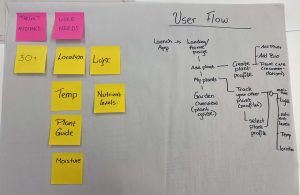
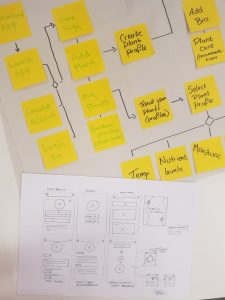
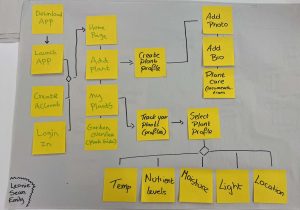
We created a simple step by step user flow of the path the user can expect to follow when using this app from the launch screen.

We each wrote the following requirements of the app on postit notes:

  • Plant Guide/ Identification
  • Plant Recommendations
  • Moisture, light, Nutrient Levels
  • Temperature
  • Plant Location
  • Home Screen
  • Add a Plant
  • Plant Care
  • Check Moisture Levels

We stuck these on a big sheet and placed them order of the flow chart. This allowed us to see the path the user would follow and how many screens we would have to produce for the app. This user flow starts from the download scren and shows the all possible options they could click on.

Sketches

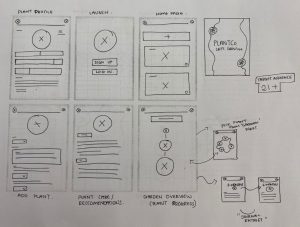
Once we were happy with the user flow, we made some indidviual wireframe sketches on paper. We all took a page of lined paper each and sketched our 6 different screens representing the app screens. This meant we had a choice of wireframes to choose from.

After we combined our ideas by choosing the best ones to draws on a larger scaled paper.  We dicussed the screens and choose the final screens. At the end of class we pitched our idea to Paul and talked through the 6 different screens and what it allowed the user to do.

Here’s the instagram post we took of our work.

Reflection

I enjoyed this team excercise as it got me working with other people in the class. It allow us to be creative and share ideas with one another. The more ideas we came up with the more succesful our final outcome would be. I felt we all worked well together. I would defintely work with them in the future. I thought their ideas and wireframing were excellent and they contributed so much.

Week 4- Sketching Interfaces (IXD303)

This Week we focused on Sketching Interfaces. Before designing it’s good to put alot of effort into sketchin/wireframing. Drawing is a very important phase in the design process. Any projects you work on make sure to always start off on paper as it helps you to brainstorm you ideas and allows you to try out different designs.

Why choose paper?

Well firstly its quick, it’s cost efficent, fast and flexible, simple and allows you to share your ideas. By using paper you can come up with different ideas before finalising it. Start getting comfortbale using pens in your designs.

According to 2020 design tools survery, the majority of designers use pen and paper when brainstorming/sketching ideas. The top software they use for digital wireframing is figma and for research it’s notion.

Diverage before configuring. Start off with low fidelity.

The key point to remember is that pratice makes perfect.

Some designers I will look at for inspiration is Sarah Cupples, Cathal Dixon and Paddy Donnelly.

Relearning to Draw

Doesn’t matter if you are a designer or not everyone can draw. Sketchnotes is a great tool to use to help you sketch out ideas on paper. When you are taking notes you can sketch out images/icons which can help you make it clear and easy to understand efficently. When doing this limit your palette focus more on drawing.

Another tool you can use is visual starter kit which can help you make your notes and planning more visual.  Visual images/ sketches are great as they allow people to process content much faster than text by getting striaght to the point. Images are a lot clearer to understand than word. For example when you see a sign you automically know what it is.

Sketching is a thinking process. Getting the point of communication across is to the user is more important than the drawing.

Speed Drawing Excerise 

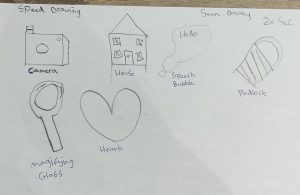
To help us feel more confident in are drawing ability. Paul set us a task to draw the following:

A Camera, house, speech bubble, a padlock, a magnifiing glass and a heart in 20 seconds, then again the same in 10 seconds then 5 seconds respecitvely. This was a fun task as it allowed us to be free and as creative as possible in the short time frame given for each image. I think it was good seeing the drawings we could come up.

2. Mapping Flows
  • Start on paper then develop it.
  • Get the logic right
  • Test use flows on research users
  • Then when happy build it.

You can use Figma or Miro to design user flows.

By making sketches it mimalises the risk of mistakes. Innovation is easy. An idea is nothing than a combination of ideas.

Example of a userflow is when you make a post on Instagram.

3. Sketching Interfaces

Sketching is not nesscary about being a good artist it’s more so being a good thinkier.

Tips to consider when sketching

  • Use a thick Pen
  • Draw striaght Lines
  • Add Colour
  • Make sketches clear and easy to follow
  • use the right tools
  • time yourself
  • Best to prototype early and often as possible.

Reflection

Following todays lecture I learned that when making sketches it’s better to keep them simple and clear rather than to over complicate them. It’s better to have the process and idea on paper to allow the use to grasp the understanding. I enjoyed doing the excercises as it allowed me to be creative. I can also take away from today how important it is sketching on paper is before jumping into any project. I make sure to sketch and wireframe my app before digitalising it as it help to enchance my protype and improve the users experience.

Law of Ux- Hicks Law IXD303

Another Law we briefly covered was Hicks Law which is named after Psychologist William Edmund Hick. It is commonly used in the field of UX design.

This laws states “the more choices avilaible to the user, the longer it for them to make a decision. ” Therefore the less choices they have the quickier they will take to make a decision.

It’s important as a designer not to overload the user with information as they will lose interest. By following Hick’s Law you can improve your website and make the process smoother.

Key things to do:

  • Break down complex task
  • Simplify the choices availible to the users which will increase their decision making.

Example

A good example of this is a classic remote with alot of buttons. Most of them buttons are not nesscary. Therefore it causes frustration and congintive load as users are unable to decid what to click. But by creating an simplified version of remote with less options it makes it easier to use and process.

Reflection

I will use this Law in my project to improve the user’s experience. I will esnure to only provide them with relevant and simplifed options when creating my app/website which makes it clear and simply for my targert audience to process.

Healthcare-Autism Research (IXD303)

What is Autism?

Autism is a disability/ condition which is spotted from an early age. Other’s names used for autism are ASD, ASD or Asperger’s. Autism means your brain works differently from others.  Autism is easier to spot in boys than girls. It’s thought that over 1 in 100 people are on the autism spectrum and around 700,000 of adults and children in the UK who are autistic.

People with autism have a wide range of complex problems both physically and mentally. They may have difficulty with social interactions, communication, behavior/repetitive issues, anxiety, stress, sensory issues such noise, lights, etc. as well as understanding or processing information

Each person with autism is different. Therefore, there needs, and problems may be different depending on the individual. Some people may need little support while others may need a lot more.

Other physical or mental health Conditions people with autism may have

  • ADHD
  • OSD
  • Bipolar Disorder
  • Dyslexia/Dyspraxia
  • Anxiety
  • Epilepsy
  • Schizophrenia
  • Allergies
  • Asthma
  • Diabetes
  • Heart Disease
  • Cerebral Palsy
  • Depression

Top Apps for autism

Proloquo2Go– An app designed for people who are nonverbal.

Endless Reader– An App which helps them to develop their reading skills

Language Therapy for Kids- MITA

An app used to help them to communicate, develop their language and speak confidently. Available in multiple languages worldwide.

Otsimo/ Special Education AAC

An App that improves children’s speech It has different games which can personalized for a child’s specific needs.

CommBoards Lite-AAC Speech Assistant

An App that provides a communication assistance method that lets users tap on images, hear sound and word pronounced aloud to help them learn.

ABC Autismo

An App that allows people develop their skills, confidence and have fun while learning.

https://www.spectrumnews.org/news/adults-with-autism-are-at-risk-for-host-of-health-problems/#:~:text=The%20health%20complications%20that%20accompany,disorders%20such%20as%20cerebral%20palsy.

www.autism.org.uk

www.hns.uk

https://www.healthline.com/health/autism/top-iphone-android-apps#language-therapy-for-kids

https://www.autismspeaks.org/medical-conditions-associated-autism

Week 3- Design & Strategy(IXD303)

This week in class we had a lecture on Design and Startegy. There were a number of different strategies we covered.

  1. AI and UI Techonolgy.

Paul showed example of sites which can allow users to create, logos, videos, banners mockups instantly. Although these online tool are great but there is no creatively. They all follow a similar layout. In future these designs may become more sophicated but they can’t  be used to replace the designers. There was an article Will Al replace designers which would be a good read.

Outstanding Ai

Everthing we’re doing currently in ux design such as:

  • Empathy
  • Creativity
  • Idea Generation
  • Lateral Thinking
  • Strategy

These are examples of UX Design

There are big companies which are mostly Design Led these include:

  • Facebook
  • Apple
  • Instagram
  • Twitter
  • Uber
  • Mailchamp
  • Adobe

2. BHAGS- Big Hairy Audacious Goals. This is basically a long term goal that inspires everyone in the business to understand and get behind. They are used to help boost and exite people in order to achieve their goals.

Examples: JFK: The Moon, Microsoft or SpaceX

What might that look like?

Website, App, Email Channel or Social Media.

Frame Your Design Challenge

During class we were asked to Frame our own design Challenge based on IDEO’s idea. We had to consider the following questions:

  1. What is the problem you’re trying to solve
  2. Try to frame it as a deisgn question
  3. What’s the impact you are trying to have?
  4. What are some of the possible solutions to your problem?
  5. Write some of the context and constraints you are facing?
  6. Does your question/Design need a change/edit?

I wrote my own.

Laws of UX

  • Hicks Law states that that time it takes to make a decision increases with the number and complexity of choices avaible.
  • Basically simplify the choices of people to increase decision making. The less decisions the quickier the choice is made.
  • Break down complex tasks

Congnitive Load

Don’t overload the user with too much Information. Make your design clear and simply for your targert audience. Good examples of this process used efficently is Google. They make it clear and easy to understand.

Onboarding

(Defintion)

Offboarding

(Defintion)

(Examples)

Dark Patterns

Dark patterns are used on internet to catch users out by making them do things they don’t really want to do. For example buying or subscriping to something.

Users/ Human 

These are the targert audience of the design. It’s important to empathise with them.

The Blank Slate

User Personas Vs Jobs to be done

We’ll need to focus on developing these next by undersanding your personal users. User Personas are your typical users whose needs you should look to meet. It’s important to get into the mindset or the users and their goals to help your design.

Things to include the User Personas:

  • Bio and Photo
  • Name
  • Age
  • Location
  • Goals
  • Threats

Example: Ul Generator or Username Generator

Common Problems with User Personas

They are amalamtion an average of attributes. There is no indivually they are all similar answers.

The Persona Spectrum


We watched a video explaining Mcdonalds Milkshake Process.

Jobs to done

There is number of jobs to be done:

  • Dentifty Jobs customers are trying to do
  • Catergoise the jobs
  • Define
  • Competitors
  • Priortise the JTBD expectations
  • Releated outcome expectations
  • Outcome Statements
  • Jobs evolve much more slowly

We watched a short clip from Mad men

So what is your “Job to be done”? Consider this.

Inclusive Design

We then looked into Inclusive Design and Accessibility. As a Ux designer this is very important to consider. Inclusive Design is a method that enables and draws on the full range of human. The design we create should be accessible to all users.  There is a range of impariments and different disabilities to consider when it comes to design.

In the image below you can see different types of disabilities both peramanent, temporary and situational.

Disability Defintion


Consider the Who, what, where, when, why and how approach in your design. When designing a product empathy with your audeince. This can be done through an empathy map.

This week:

I will continue my research and hopefully start coming up with ideas for my designs.

Reflection

Today’s class gave me an eye openers into different design strageys and things I could in my design for my project. It also made me more aware of different users and there complex needs and how I should make my design to meet all their needs.



IXD303- Postels Law

This week we learned about “Postels Law” which is sometimes referred to “Robustness principle”. Following on from last weeks class this is 2nd one we covered. This law is a commonly used in the field of interaction design and computer. Postels Law states “Be liberal in what you accept, and conservative in what you send.” Postels Law was named after American computer scientist Jon Postel, who contributed to the early development of the internet. Postels Law has been around since 1980 and still very important in today’s Society.

In the following weeks to come I will try to apply this law to my designs.

Week 2- Research Techniques (IXD303)

Anything can be disrupted. For example a Calendar. How can you make it innovated? It’s the same when designing our healthcare product specially think of your target audience. Who is it aimed at? How much will it cost? etc.

We then looked at research techniques.

  1. Needs driven design

When designing a product or website, ask yourself.

  • Does this product need to exist?
  • What users needs are you solving?
  • What’s the users goals are you trying to achieve?

Just remember it’s never too early to involve your users. It’s better to do it from the start rather than leaving it until you are half way through your development of your product and then finding out you haven’t met the needs and having to rethink your ideas.

2. Grand Reveal Vs MVP

Grand Reveal refers to a design which is worked on behind closed doors then revealed to the world without anyone known once then are happy.

  • A popular example of a product which is successful is the iPhone when it is reveled.
  • Sometimes it doesn’t always work out like the Segway. It never reached the heights which it was expected it.

Group Class task:

Firstly we individually had to research our local health centre and look at their website to see it included the following information:

  • Opening Hours
  • Services
  • Prescription orders
  • doctors
  • Book an Appointment

We then had to screenshot the website from our area and paste it onto our class Miro board for others to view and analyze. Paul asked us to get into our groups and write on post it notes the actions, questions, happy moments, pain points, opportunities for the new patients, finding staff, book appointment, opening/out of hours and orders prescription on our chosen GP website. As a group we came up with a lot of ideas for each pin point. You can see this in the image below.

Discovery & Research

Through user research you can:

  • Find/understand users
  • understand their problems and opportunities
  • Shared vision

Types of research:

  • Exploratory research
  • Stakeholder Interviews
  • Workshops

Competitor Analysis

When doing a competitor Analysis it’s good to look at the competitors which are already out there and understand the market, spot the industry trends and set benchmarks for future growth.

Types of competitors:

  • Direct or Indirect
  • Do a Swot Analysis

This will be important to consider when looking at other sites/apps on the market when creating my healthcare application.

Bias and Research

  • Unconscious and Conscious
  • Cognitive Bias
  • Avoiding Cognitive Bias
  • Confirmation Bias. Example of this is when Donald Trump was president,
  • Anchoring
  • Groupthink
  • Selection Bias
  • Clustering Illusions

Laws of Ux

The second law we covered this week was Postal’s Law. When is basically be conservative in what you do, be liberal in what you accept from others.

Chunking Method- Breaking up info to make it easy to understand. Breaking down chunks of info.

Create a patient registration

So in pairs or group of 3 we were asked to design an online patient registration form for a health centre. We had to include the following information:

  • Patient details
  • Title
  • Gender
  • Surname
  • Previous surnames
  • First Names
  • Date of Birth
  • Place and country of birth
  • NHS Number
  • Home Phone Number
  • Mobile Phone Number
  • Email
  • Address
  • City
  • State/Province
  • Zip/postal code
  • county
  • Please help us tract your previous medical records by providing the following information
  • Your previous address in the Uk
  • Name and address of your doctor
  • If you are form aboard
  • Were you born aboard?
  • Your first Uk address where registered with a gp
  • If previously resident in Uk, please provide the date you left?

I worked with Florence and Cormac to complete this task. We wrote out the above info on sticky notes then moved onto figma to neatly lay out the information appropriately. Paul give us 40 minutes to complete this. Some people posted it onto Miro board. It was good to see the variety of examples our class came up with.

Qualitative and Quantitative 

Qualitative data:

  • Unstructured
  • subjective
  • Immeasurable
  • Soft Science

Quantitative data:

  • Structured
  • Objective
  • Measurable
  • Hard Science

Examples of research:

  • Analytics-focus on data and stats
  • A/B Testing is were you compare two versions of a single variant
  • Online Surveys. e.g survey monkey or google forms
  • Triangulation

For next week:

Continue researching. Start to consider possible idea for digital solutions to the areas you have been researching.

Reflection

I thought today’s class was very useful as it give me some good techniques I could use when conducting my very own research. Which is very important for now and in the future work placement.


IXD303- Jakob’s Law

Laws of UX- Chapter 1 (Jakob’s Law)

Jakob’s law or commonly known as “Jakob’s law of the internet user experience” was a law invented by Danish computer researcher Jakob Nielsen in 2000 who also co-founded the Nielsen Norman Group. The law basically explains user experience on the internet and ways of making an users experience on internet easier. The law states that users tend to spend most of their time on the internet on other sites sites rather than yours.

So if your site is simple, clear and easy to navigate around, users will use their time exploring your site more efficiently. By having a similar layout and structure to other sites on internet, you will probably get more visitors returning to your site regularly to use your products or services.

By sticking to this law you’ll be able to improve user’s experience and increase the traffic numbers on your site. If you decide to not follow the law people will become frustrated or confused making them leave and not return to your site.

Note: When it comes to designing your site, consider Jakob’s law and take time to carefully design your site which will attract users attention.

Research-Healthcare in Elderly people (IXD303)

During the first week of uni we were asked to conduct research on the topic of healthcare which is our next project. Paul assigned us into groups for researching. I was placed in a group with Beth, Emma, Laura and Sophie. We discussed on Discord what age group each of us were chosen to research. I choose to research elderly people. I thought this was an exciting opportunity as it will allow me to get to communicate with other people from my class which I am not have spoken to. This was also a good practice for work place were I have to work in a team. We discussed on Discord what age group each of us were chosen to research. I choose to research elderly people. I felt I was already aware of some of health conditions through my elderly granny. It was good to find out more information and the type of things to need or how they can prevent these.

When researching I specially looked at ux design in healthcare as well as the chronic and common health conditions of the elderly people in society. Then I looked at devices and app’s which can help the elderly people.

Research 

I found out their is an increase of adults over 60 years due to fact people are living longer. Everyone will be impacted by aging.

Common health conditions include:

  • Hearing loss
  • cataracts
  • arthritis
  • dementia
  • diabetes
  • Cancer
  • Strokes
  • Heart disease
  • Motor Neurone Diease
  • Parkinson’s diease

Health care apps for the elderly:

  • Pillibox- helps them to manage their medication for their needs
  • Stresscheck- help them manage their stress levels
  • WebMD- help them learn about their health
  • Heatwise- Bloodpressure tracker allows you to monitor and track blood pressure

Wearable devices which could help the elderly:

  • fitbit
  • smartwatch
  • hearing aids
  • gps tracker
  • heart monitor

Below are links to internal sources of information.

https://www.springboard.com/library/ui-ux-design/healthcare-industry/

https://www.who.int/news-room/fact-sheets/detail/ageing-and-health

https://www.lifeline24.co.uk/medical-conditions/

https://www.ageuk.org.uk/information-advice/health-wellbeing/conditions-illnesses/

https://www.ncoa.org/article/the-top-10-most-common-chronic-conditions-in-older-adults


5 Easy-to-Use Health Apps for Seniors

Reflection

I am now more aware now of the health concerns elderly people face. I felt this was a interesting topic to research. Hopefully by doing this research this will help me come up with ideas for my health care product or app.